
1
/
of
1
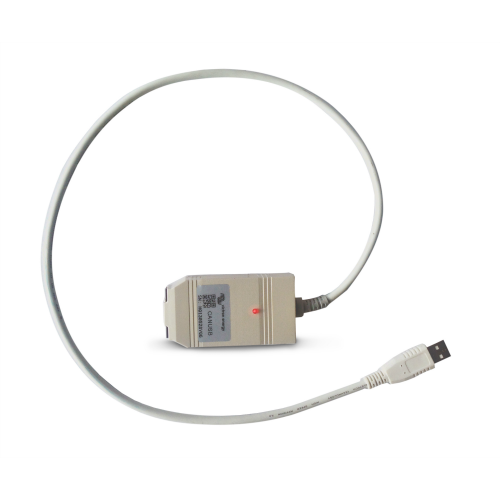
CANUSB interface
CANUSB interface
SKU:ASS030532010
Brand: Victron
Seamless Integration with VE.Can Devices
Enables Device Configuration and Firmware Updates
Plug-and-Play USB Connectivity
Includes Necessary Terminators and Manual
Compatible with VE Power Setup Software
In stock
This is pre-order - Available in 7 – 10 days
Regular price
£493.00 GBP
Regular price
Sale price
£493.00 GBP
Quantity
Couldn't load pickup availability
Product Details
Product Details
The Victron CANUSB Interface is designed to connect Victron VE.Can devices to a computer via USB.
This interface allows for the configuration and firmware updating of connected devices using the VE Power Setup software.
The package includes the CANUSB adapter, two VE.Can RJ45 terminators, and a manual.
Please note that drivers and software must be downloaded from the official Victron Energy website.
Product Specifications
Product Specifications
Technical Specifications & Package Contents
- SKU / Part Number: ASS030532010
- Interface Type: VE.Can (RJ45) to USB
- Primary Application: Connecting VE.Can products to a computer for firmware updating and system diagnostics
- Package Contents: 1x CANUSB adapter, 2x VE.Can RJ45 bus terminators, 1x instruction manual
System Requirements & Software
- Operating System Compatibility: Windows 10, Windows 8.1, Windows 7 (32-bit and 64-bit)
- Required Driver: PEAK CAN device driver (PeakOemDrv.exe)
- Compatible Software: Victron VE Power Setup
Status LED Indicators
- Solid Red (On): Connected to the operating system driver
- Slow Blinking Red: A software application is connected to the adapter
- Quick Blinking Red: Data is actively transmitting across the CAN bus
Network & Power Requirements
- Network Powering: The CANUSB adapter does not supply power to the VE.Can network. To operate, at least one connected device on the network must power the VE.Can bus (such as a Skylla-i charger, BlueSolar MPPT 150/70, or Lynx Shunt VE.Can).
- Bus Termination: Requires a terminator placed on both ends of the VE.Can network (2x VE.Can RJ45 terminators included).
Important Installation & Compatibility Notes
- VE.Can Exclusive: Designed specifically for VE.Can communication. Not compatible with VE.Bus or VE.Net ports.
- USB Extension Cable Restriction: Do not use a USB extension cable between the computer and the CANUSB adapter, as extension cables do not comply with USB specifications and can lead to adapter malfunction.
- NMEA2000 Integration: For products without an RJ45 VE.Can socket (such as BMV or VE.Bus to NMEA2000 interfaces), a VE.Can to NMEA2000 Micro-C male cable (part number ASS030520200) is required to connect to the CANUSB.
Quality, Compliance & Warranty
- Safety Standards: IEC 60335-1 safety certified
- Manufacturing Quality: Produced in ISO 9001 certified facilities
- Compliance: Official Declaration of Conformity for Victron Interfaces
- Warranty: Backed by Victron Energy's standard 5-year warranty and global support network
Product Downloads
Product Downloads